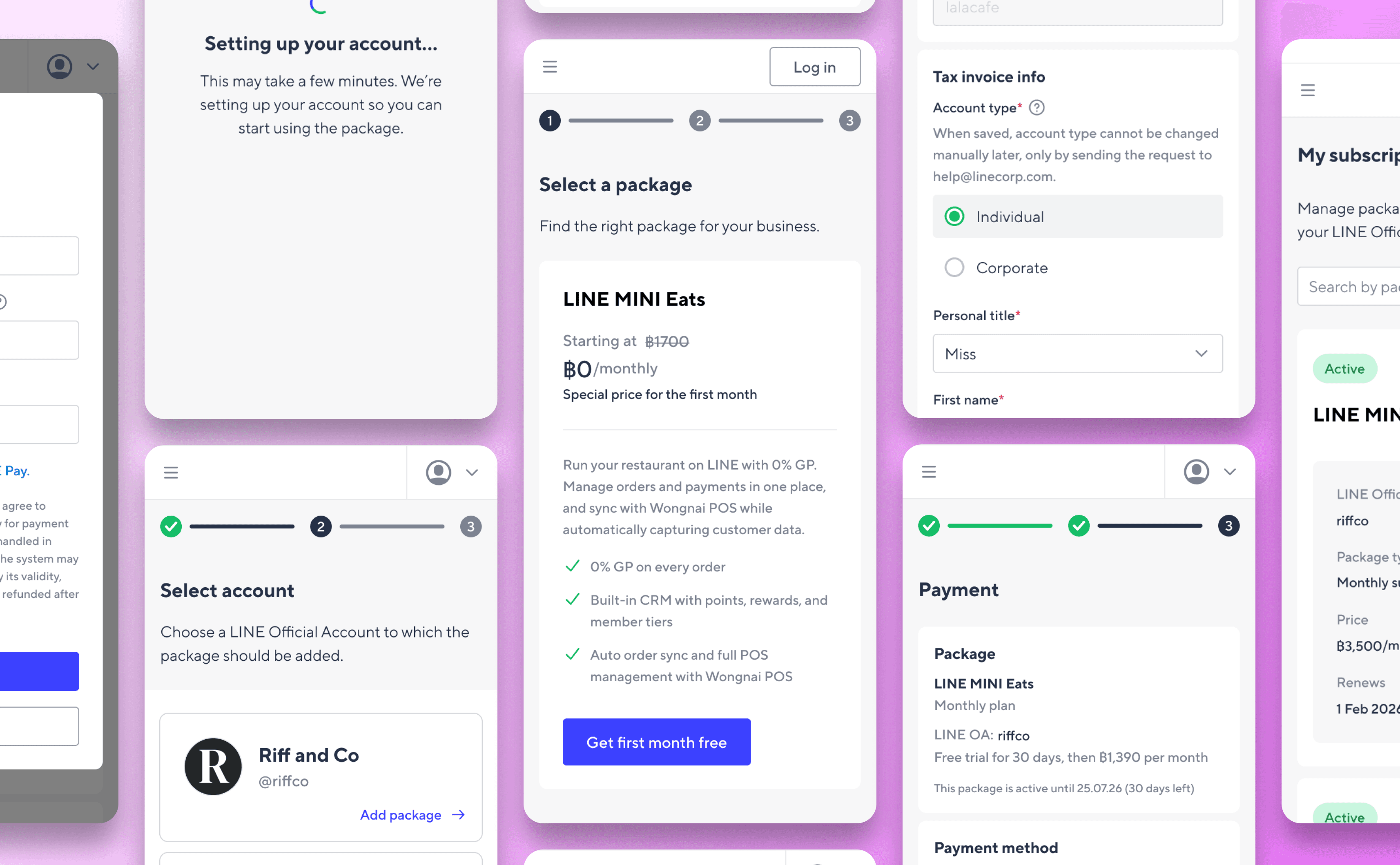
B2B marketing platform
Timeline
From discovery to shipped product across 3 sprints, running in parallel with other active design projects.
Background
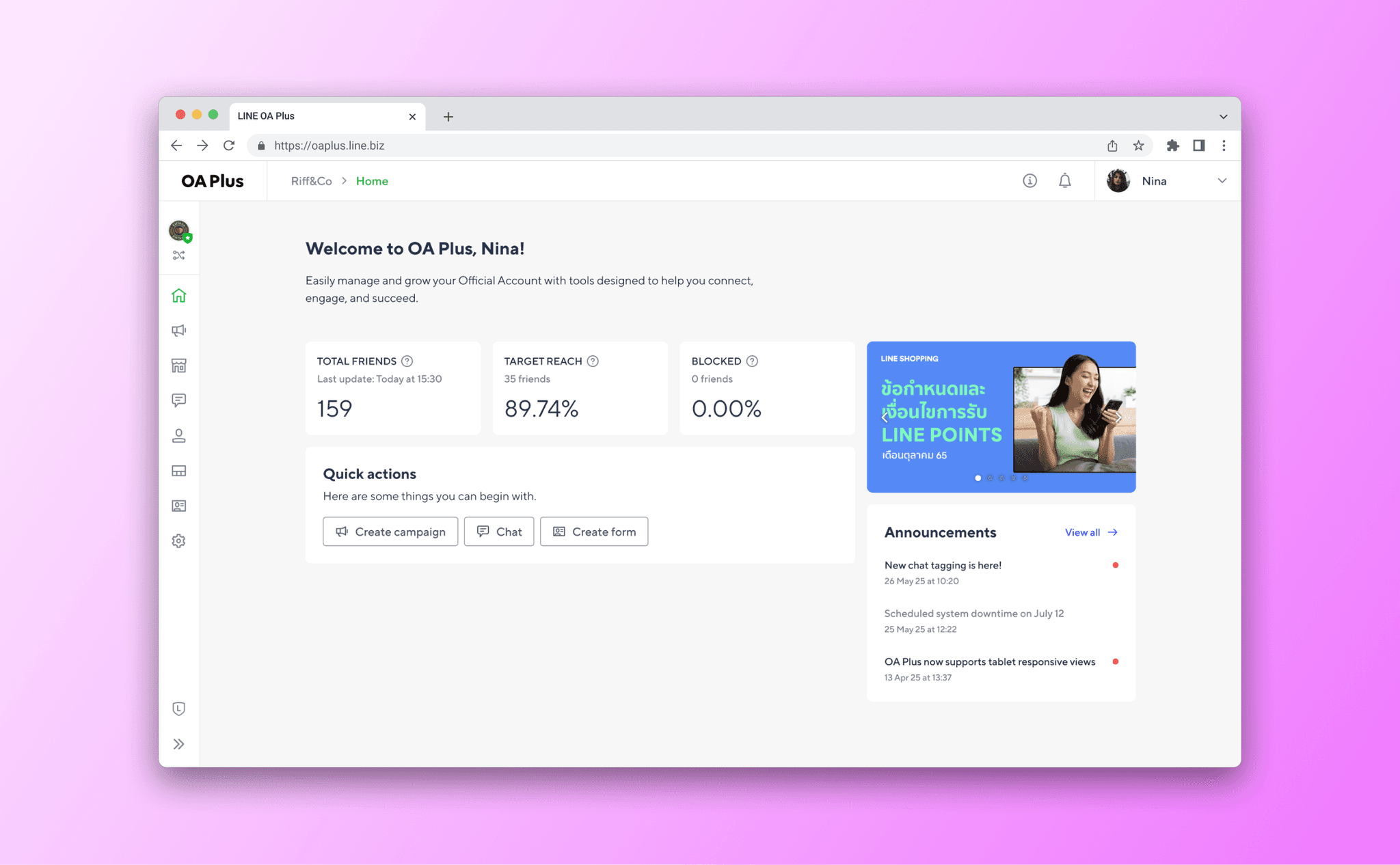
OA Plus serves businesses that have activated one or more packages (MyCustomer, CRM, and MyShop) each with different feature sets and user roles. Despite being the platform's highest-traffic page, the homepage offered no useful information on login: no account stats, no shortcuts, no updates. Users had to navigate manually every single session. The redesign introduced a functional dashboard with role-aware shortcuts, live account metrics, a CMS-managed promotional banner, and a platform announcements feed.
Led end-to-end design from problem framing and concept exploration through to final handoff, QA, and release.
Defined the content strategy for what belongs on a B2B dashboard homepage, balancing account health data, task shortcuts, commercial content, and platform communication in a single view.
Collaborated cross-functionally with PMs, engineers, and the business team, navigating CMS integration via Landpress for both banner and announcement content.
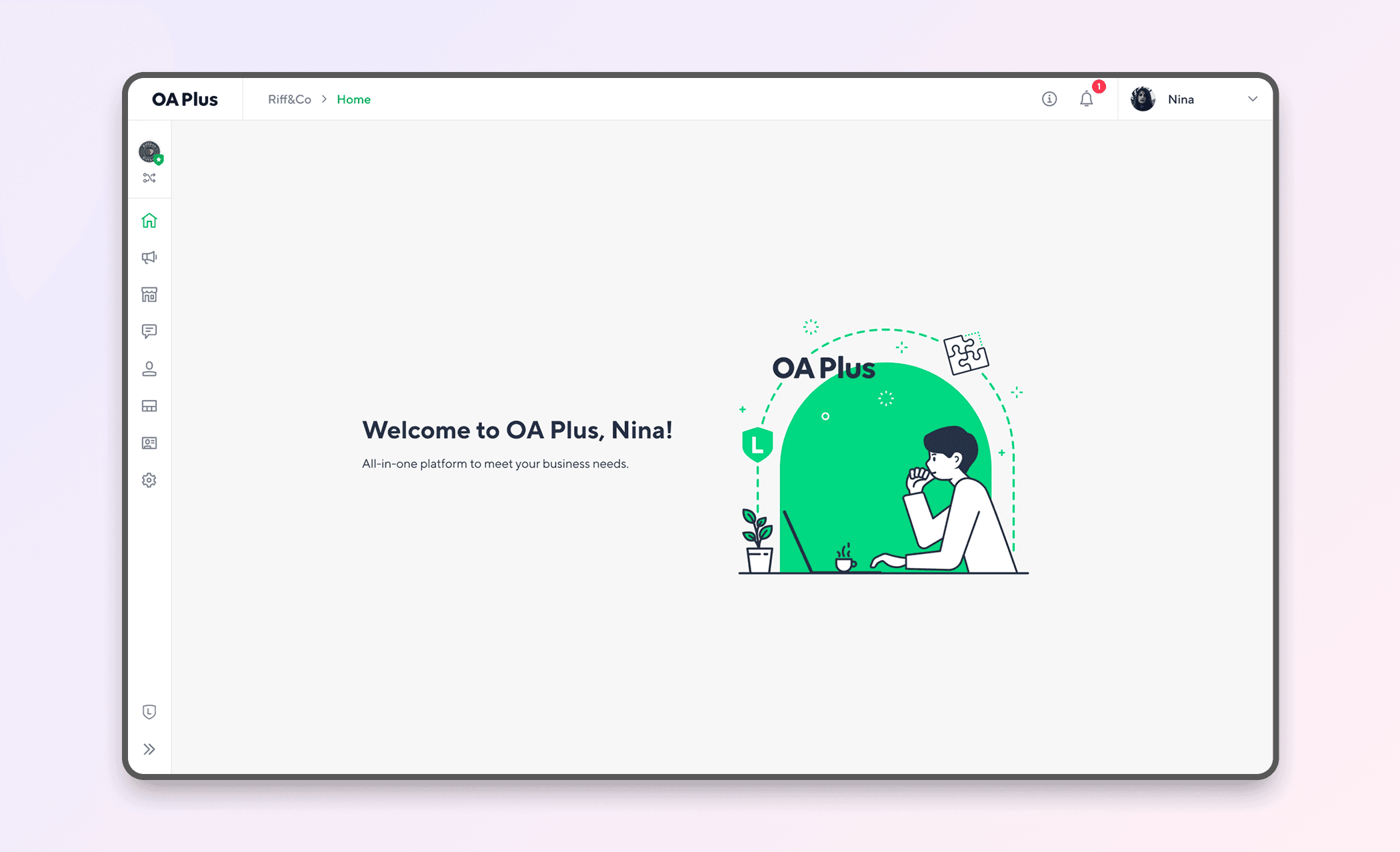
The entire screen is occupied by an illustration and a greeting. There are no stats, no shortcuts, no recent activity, no guidance on what to do next. Users have to navigate entirely from the sidebar.
For users
The most common questions after login are "How is my account doing?" and "What should I do next?" The old homepage answered neither. Users had to navigate manually to find their friend count, their campaign status, or any key feature, adding unnecessary friction to every session.
For the business
The homepage is the highest-traffic page in the product. Every visit is an opportunity to surface relevant features, drive engagement, and communicate platform updates. The old design left all of that value on the table.
Three design goals followed from this:
01. Reduce time to first action
Users should be able to reach their most-used features without navigating away from the homepage.
02. Surface account context immediately
Key account health metrics should be visible on login without any extra navigation.
03. Support different users with different needs
OA Plus serves multiple package combinations: MyCustomer only, CRM only, MyShop only, and combined. The homepage needs to adapt to the user's actual context, not show a generic view.
"As a user, I want to be able to see the important information about my account and the system, as well as access features more quickly, thereby increasing work efficiency."
Methods
Analytics review, user interviews (2 Enterprise admins, 2 SMB owners, 1 SME), competitive audit
What I looked at
Navigation paths within the first 60 seconds of a session
Features accessed most frequently by role and package type
How comparable B2B dashboards (HubSpot, Klaviyo, Meta Business Suite) structure their homepages
Key findings
78% of sessions navigated away from the homepage within 30 seconds, with an average dwell time of under 15 seconds
Top 3 post-login destinations: Broadcast, Chat, Campaign - consistent across Enterprise, SME, and SMB accounts
Users with multiple roles expected shortcuts to reflect their actual access, not a generic set
All three benchmarked platforms (HubSpot, Klaviyo, Meta Business Suite) prioritized account health metrics above the fold, with shortcuts in the second visual zone
These findings shaped three core decisions:
Surface audience health stats immediately on login
Ground shortcuts in actual usage data rather than feature hierarchy
Design role-aware configurations instead of a single generic set
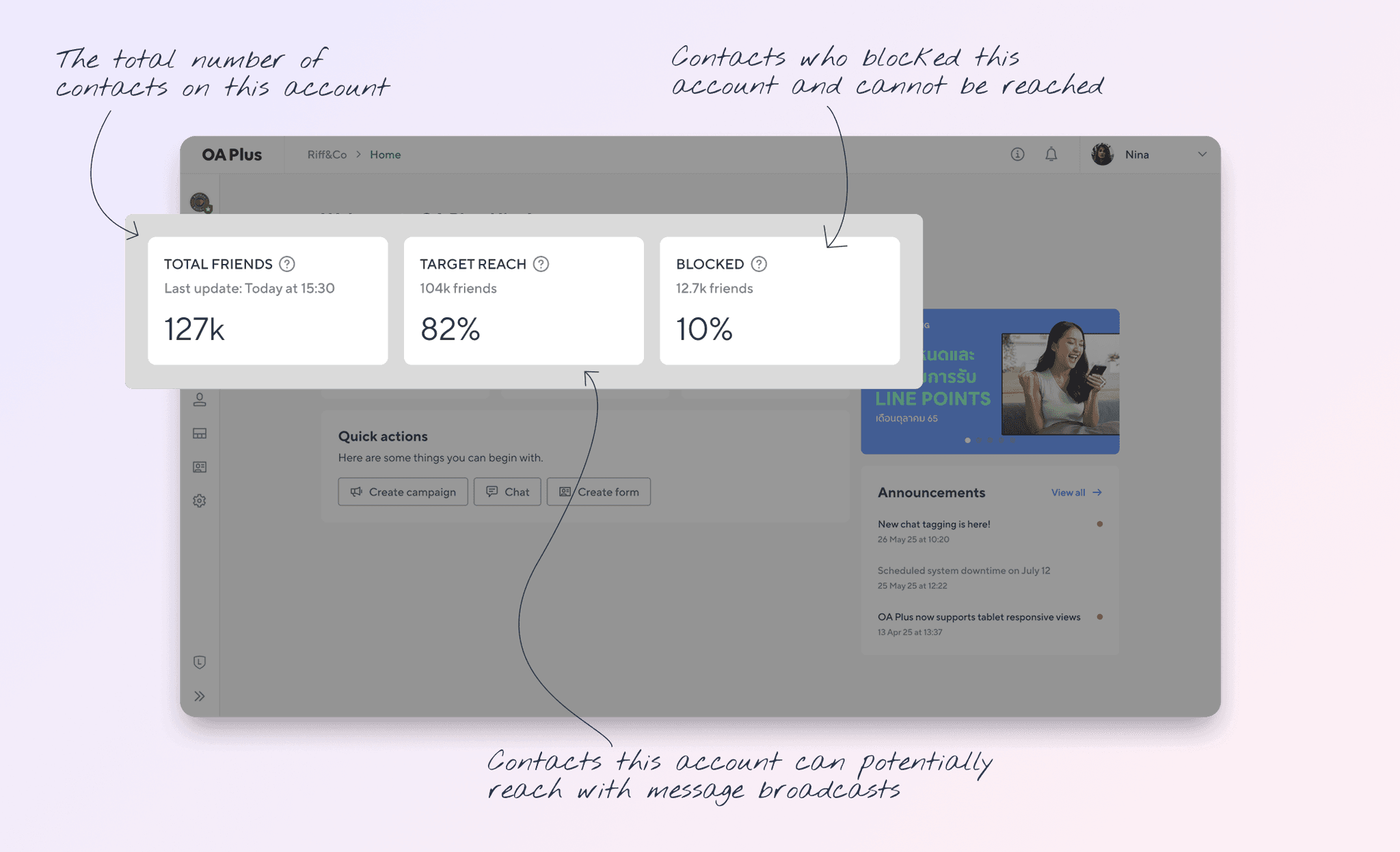
⇥ Total friends answers the most basic question on login: how many people can I reach?
⇥ Target reach percentage shows the proportion of friends who are reachable, not blocked or inactive. This is the metric that actually matters for campaign planning.
⇥ Blocked metric: a low number here is reassuring. A high number is a signal to investigate. Surfacing it passively means users catch problems earlier."
The three stats (Total friends, Target reach, Blocked) are pulled directly from the audience dashboard, requiring no extra navigation to access. Together they answer the question every account owner asks every time they log in: is my account healthy, and who can I reach? For account owners, audience health is the foundational metric. Everything else (campaigns, automation, CRM) depends on it.
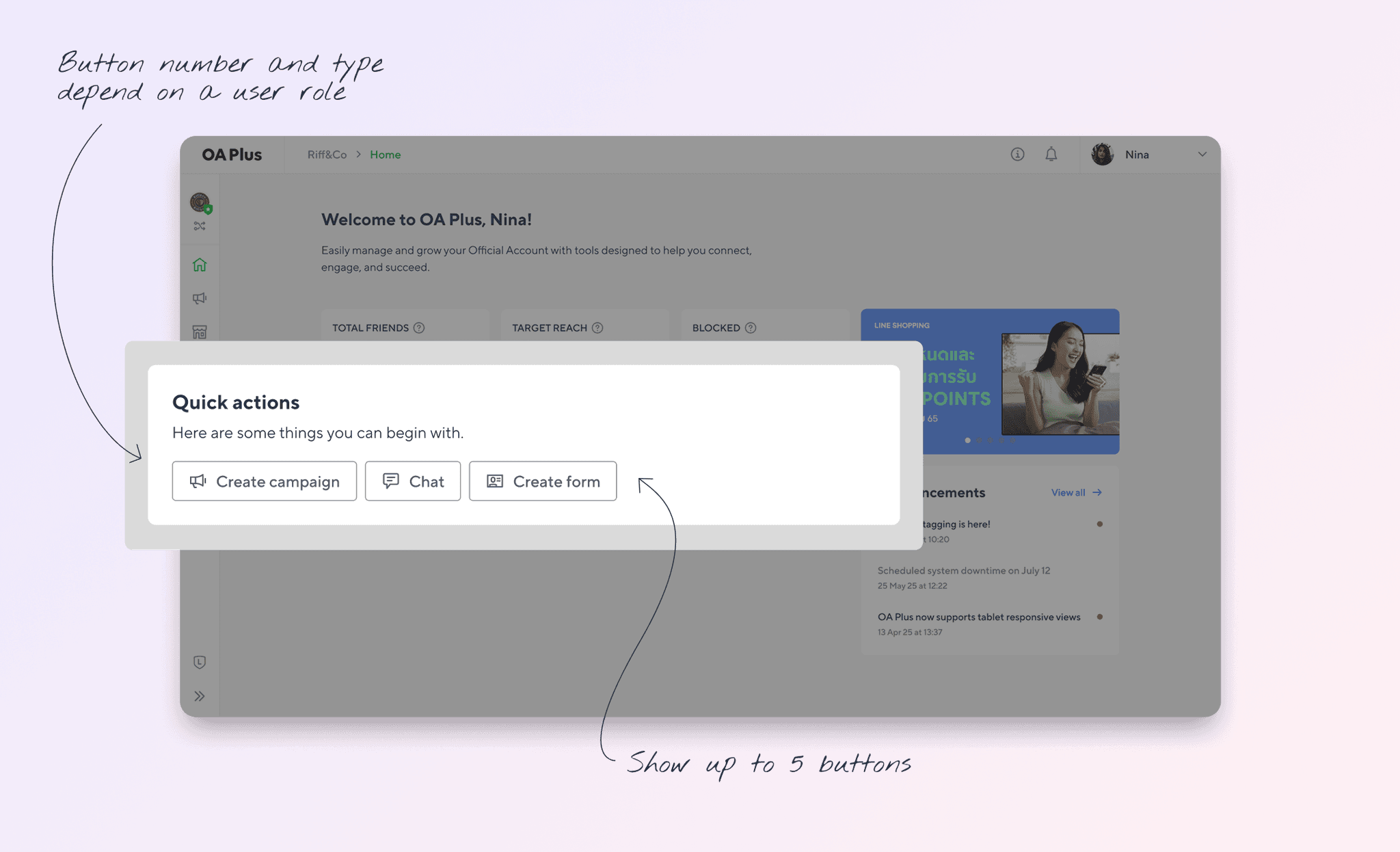
⇥ Section header sets expectations clearly. This is a starting point, not an exhaustive menu.
⇥ Button set: shortcuts are determined by top feature usage data and filtered by user role. Users of OA Plus fall into several categories based on which packages they have activated: MyCustomer only, MyCustomer | CRM only, MyShop only, and MyCustomer | CRM + MyShop combined. Each combination has different features available. On top of that, each user has a role that further filters what they can access.
Rather than designing one set of shortcuts and hiding unavailable ones, I designed four distinct shortcut configurations mapped to the package combinations, with role-based filtering applied within each.
For example:
A MyCustomer administrator sees: Create campaign, Create group, Create form, Create auto-response message, Create segment
A MyShop basic operator sees: Chat, Campaign, Tags, Groups, Auto-response messages
A combined CRM + MyShop admin sees: Chat, Campaign, Customer, Add points, Redeem coupon codes
⇥ The shortcuts are not one-size-fits-all. They vary by package (MyCustomer users see different shortcuts than MyShop users, and users with both see a combined set) and by role (administrator, advanced marketer, marketer, and basic operator variants each have different feature access, so their shortcuts reflect what they can actually do).
The shortcut selection was grounded in actual usage data. The top features accessed by each role were mapped, then condensed into a set of 3 to 5 shortcuts that cover the highest-frequency actions without overwhelming the screen. This ensures every user sees shortcuts that are actually relevant and accessible to them, not a generic list with some items greyed out, which creates confusion and lowers trust.
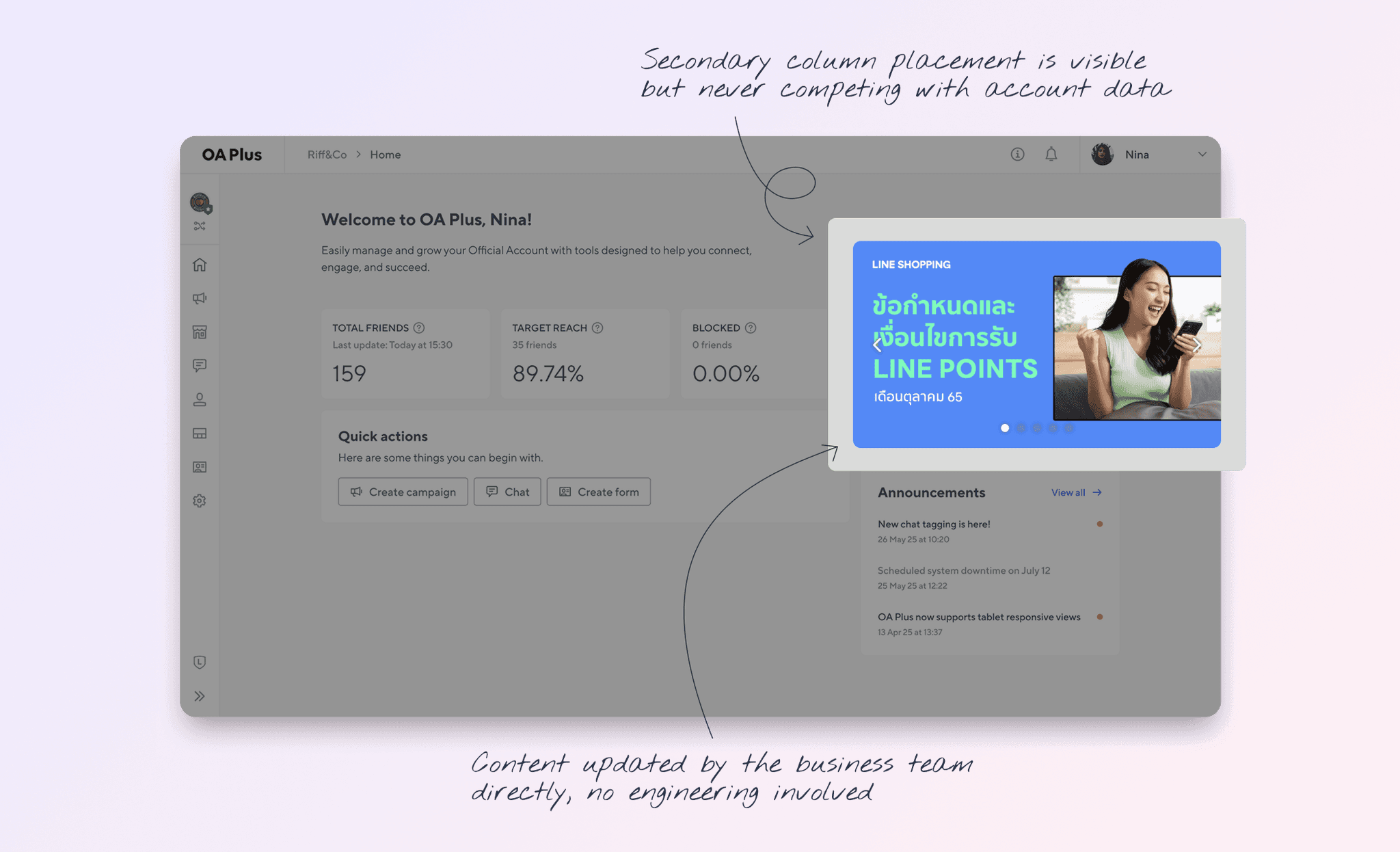
⇥ Banner carousel is placed in a secondary column. Visible and prominent, but never competing with the user's primary account information.
⇥ Multiple banners are managed via Landpress CMS by the business team. No engineering required for content updates.
⇥ Banner leads to a new tab. It keeps the user anchored in OA Plus while allowing them to explore promotional content.
The banner serves a commercial function: it allows the business and marketing teams to communicate time-sensitive promotions, partner content, and platform updates without engineering involvement. From a UX perspective, its secondary column placement preserves the primacy of account data and shortcuts. Users who are not interested in the promotion can ignore it without it disrupting their workflow.
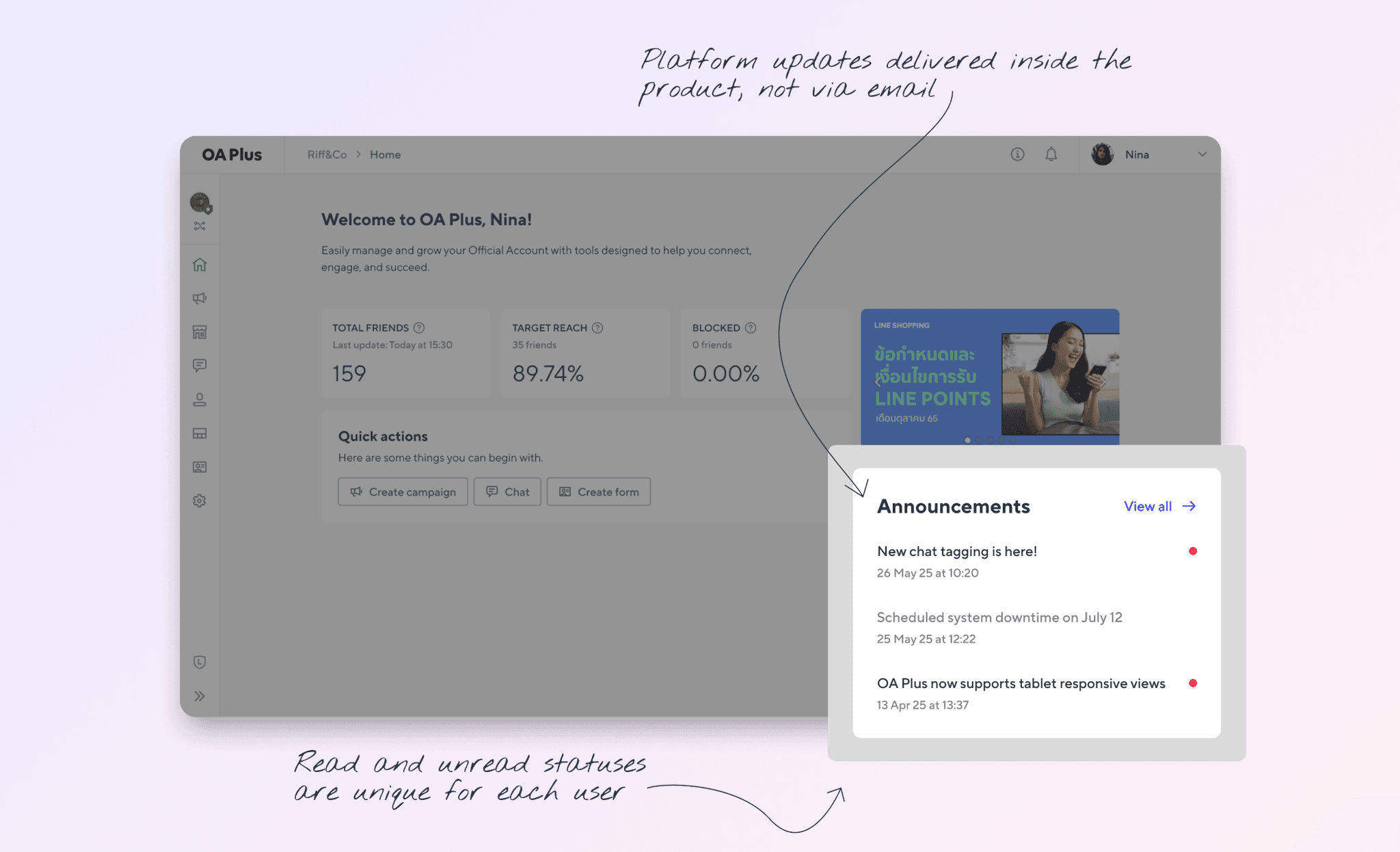
⇥ Unread indicator per user. Users only see the dot for announcements they have not yet read.
⇥ "View all" button provides an escape hatch for users who want the full history, without cluttering the homepage with a long list.
⇥ Like the banner, announcements are managed via Landpress CMS, allowing the team to publish, schedule, and categorise updates independently.
Before this redesign, OA Plus users had no way to see platform announcements from within the product. Updates were communicated externally via emails and support channels, creating a fragmented experience. This section brings platform communication into the product, reducing information asymmetry between the product team and its users.
The announcement section and banner were immediately adopted by the business team as their primary in-product communication channel, validating the decision to include them in the scope.
A homepage is a product decision, not a design exercise
The hardest part of this project was not designing the components. It was deciding what belongs on the homepage at all. Every team had something they wanted to surface. The discipline was in asking: what does the user need in the first 10 seconds after login? Everything else is secondary.
Role-aware content is worth the complexity
It would have been faster to design one set of shortcuts for everyone. But shortcuts that do not match a user's actual role are noise, and noise erodes trust faster than an empty screen. The extra design work to map shortcuts to roles and packages paid off in a product that feels like it knows who you are.
CMS integration is a design decision
Handing control of the banner and announcements to the business team via Landpress was not just an engineering convenience. It changed the nature of those features from static design elements to living communication channels. Thinking about who operates a feature, not just who uses it, is part of the design work.