B2B marketing platform
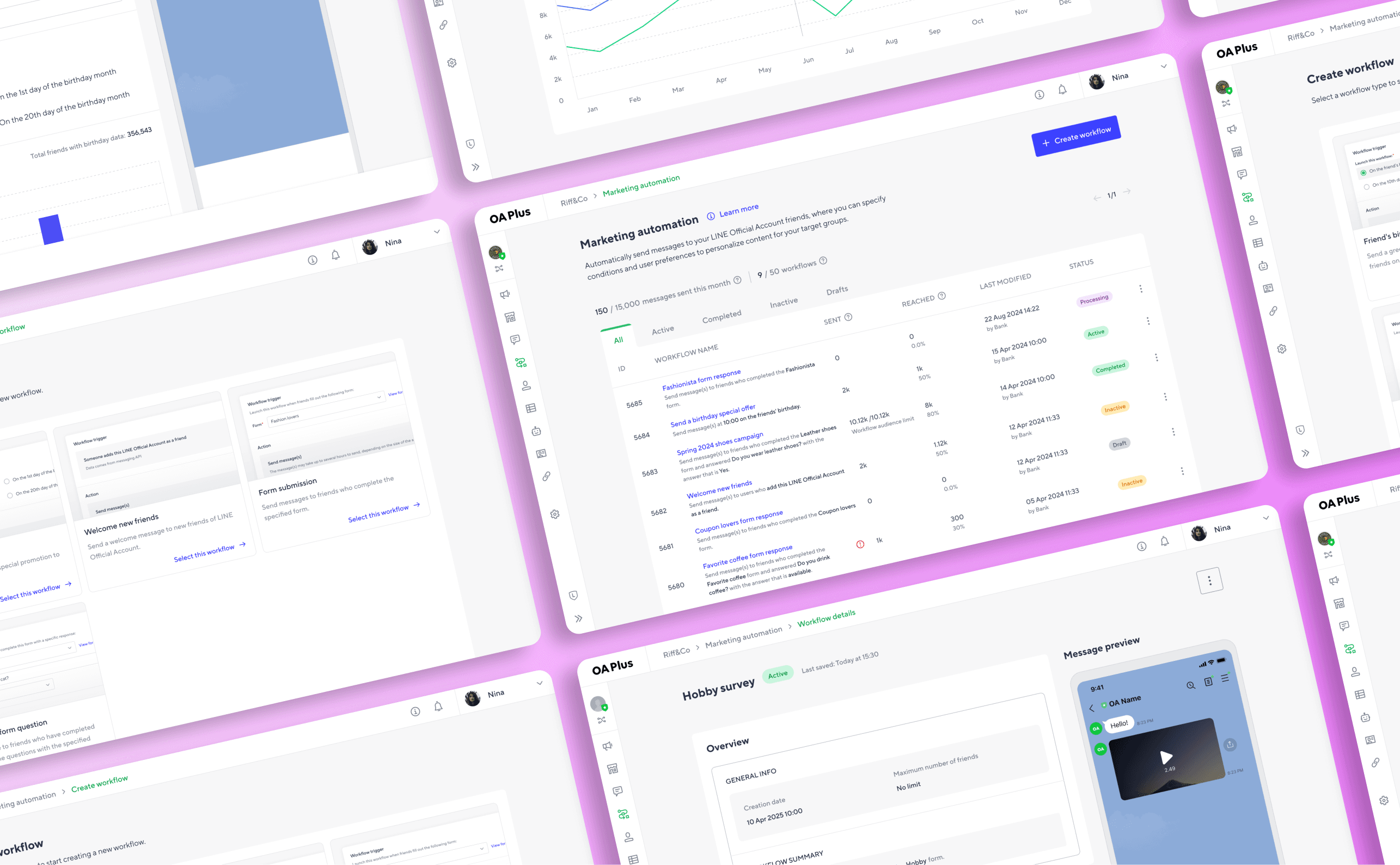
LINE Thailand set out to build a self-serve purchase platform for its growing MINI App ecosystem, giving merchants a way to discover, buy, and manage MINI App packages independently, without going through a sales team.
Timeline
From discovery to shipped product across 2 to 3 sprints, running in parallel with other active design projects.
Background
Subscription Center is the merchant-facing platform that underpins LINE's MINI App ecosystem. It handles the full purchase journey for single-branch merchants: package discovery, LINE Business ID authentication, Official Account linking, payment, and post-purchase subscription management. The platform launched with LINE MINI Eats, a package that puts a restaurant's menu and pre-order functionality inside the LINE app, and is architected to expand to additional verticals including beauty and retail.
~90% payment success rate across all purchase attempts
Below 10 min estimated average time to complete the full purchase flow on mobile
0 sales interactions needed to discover, buy, and activate a MINI App package end-to-end
Led end-to-end design of Subscription Center from problem framing and flow definition through to final handoff and release.
Owned the full merchant journey: package discovery, purchase flow, subscription management, and cancellation. Defined how LINE's existing identity and payment infrastructure (LINE Business ID, Official Account selection, PYM) should be integrated into a mobile-first, self-serve experience.
Collaborated cross-functionally with PMs, engineers, and the payments team to navigate integration constraints and scope trade-offs for Phase 1.
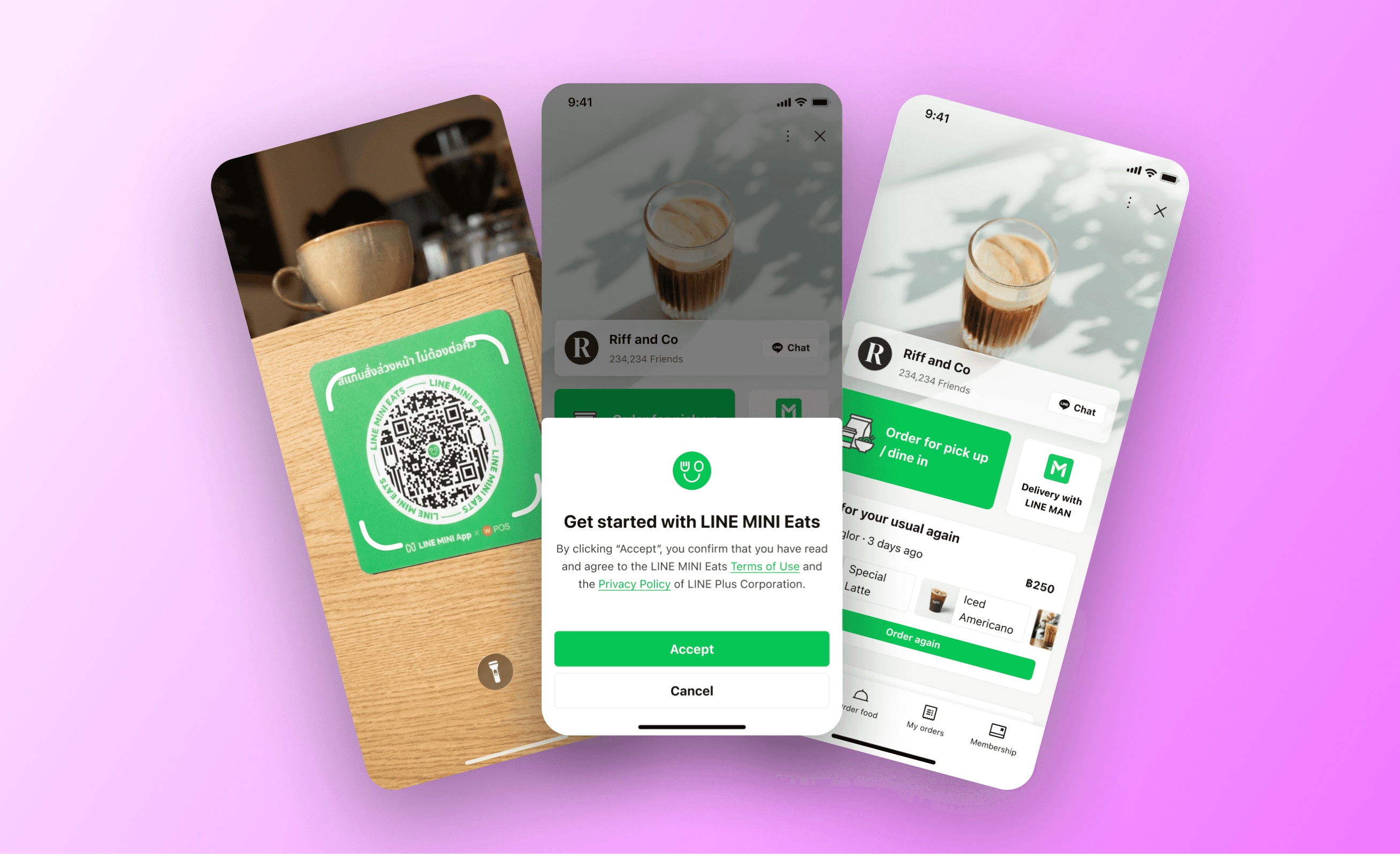
LINE MINI Eats shop example. Users arrive on this page by scanning promotional materials, through chat with a merchant's Official Account in LINE Messenger, or directly from the LINE MINI App menu.
The gap was felt on both sides:
For users
Independent restaurant owners want to know if MINI Eats is right for them, buy it, and get started. Every day spent waiting for a sales rep is a day their menu is not inside LINE.
For the business
LINE's sales team was built for enterprise accounts. Reaching thousands of single-branch restaurants through the same channel would be slow, expensive, and impossible to sustain. Ecosystem growth at scale required a purchase path that did not need a person in the loop.
The product was ready. A way to sell it to the long tail of independent restaurants was not. Subscription Center was built to close that gap.
Three design goals followed from this:
01. Make the purchase path self-serve and complete
Merchants should be able to discover a package, buy it, and activate it without any sales involvement. The flow needs to handle everything: authentication, account linking, payment, and confirmation.
02. Build a management layer merchants will actually use
Buying is the start, not the end. Merchants need to view their active subscriptions, access their payment history, download tax invoices, and cancel if needed, all from one place.
03. Design for mobile without losing what makes it a B2B tool
Most Thai merchants access business tools on mobile. But a multi-step purchase flow with account linking and payment is genuinely complex. The goal was not to simplify by removing steps. It was to make each step feel manageable on a small screen.
"As a merchant, I want to be able to purchase and start using a LINE MINI Eats package on my own, so I can get my restaurant inside LINE without waiting for anyone."
Methods
Requirements workshop (kick-off alignment, flow definition with POs and engineering), merchant interviews (3 single-branch restaurant owners, 2 SMB operators), competitive audit of other merchant purchase and onboarding flows
What I looked at
How merchants currently interact with LINE Business ID and OA management in existing tools
Purchase and activation flows on comparable platforms (Shopify, Grab Merchant, Wongnai)
Mobile checkout completion patterns for multi-step B2B flows
Key findings
Multi-step mobile flows drop off most at authentication and account-linking, not at product selection. Merchants who hit an unexpected step mid-flow abandon at a significantly higher rate
Thai merchants evaluate new B2B tools primarily on speed of activation. Feature depth matters less than how quickly they can see the product working
Platforms handling similar complexity (Shopify, Grab Merchant, Wongnai) use single-task screens on mobile rather than combined forms. Fewer screens is not always simpler
These findings shaped two core decisions:
Design each step as a single focused task, especially on mobile, rather than combining steps to reduce screen count
Show the full purchase journey upfront so merchants know what to expect before they start
Subscription Center's entry point is the public marketplace listing. Merchants arriving from LINE MINI Eats landing page.
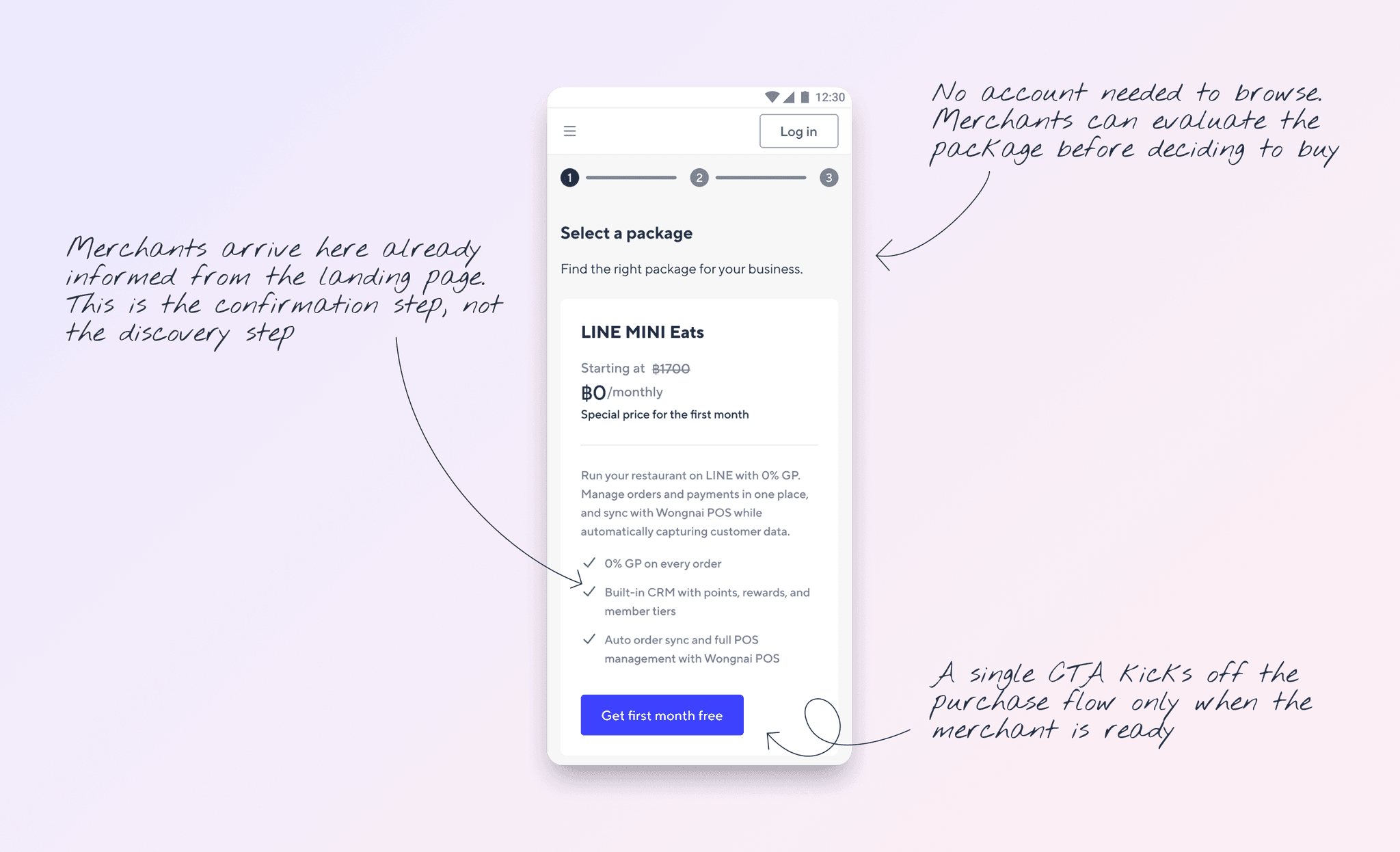
Package selection page
⇥ Packages are visible without authentication.
⇥ Pricing, included features, and activation details are surfaced at this stage.
⇥ The purchase flow only begins when the merchant actively chooses to buy.
Gating the listing behind a login would add friction before the merchant has any reason to commit. Letting them evaluate first means the ones who enter the purchase flow have already made a decision. A self-serve funnel that starts with informed intent converts better than one that starts with a wall.
To buy a MINI App package, a merchant needs to authenticate with LINE Business ID, link their Official Account, and complete payment. These are three separate systems that needed to feel like one coherent flow, primarily on mobile.
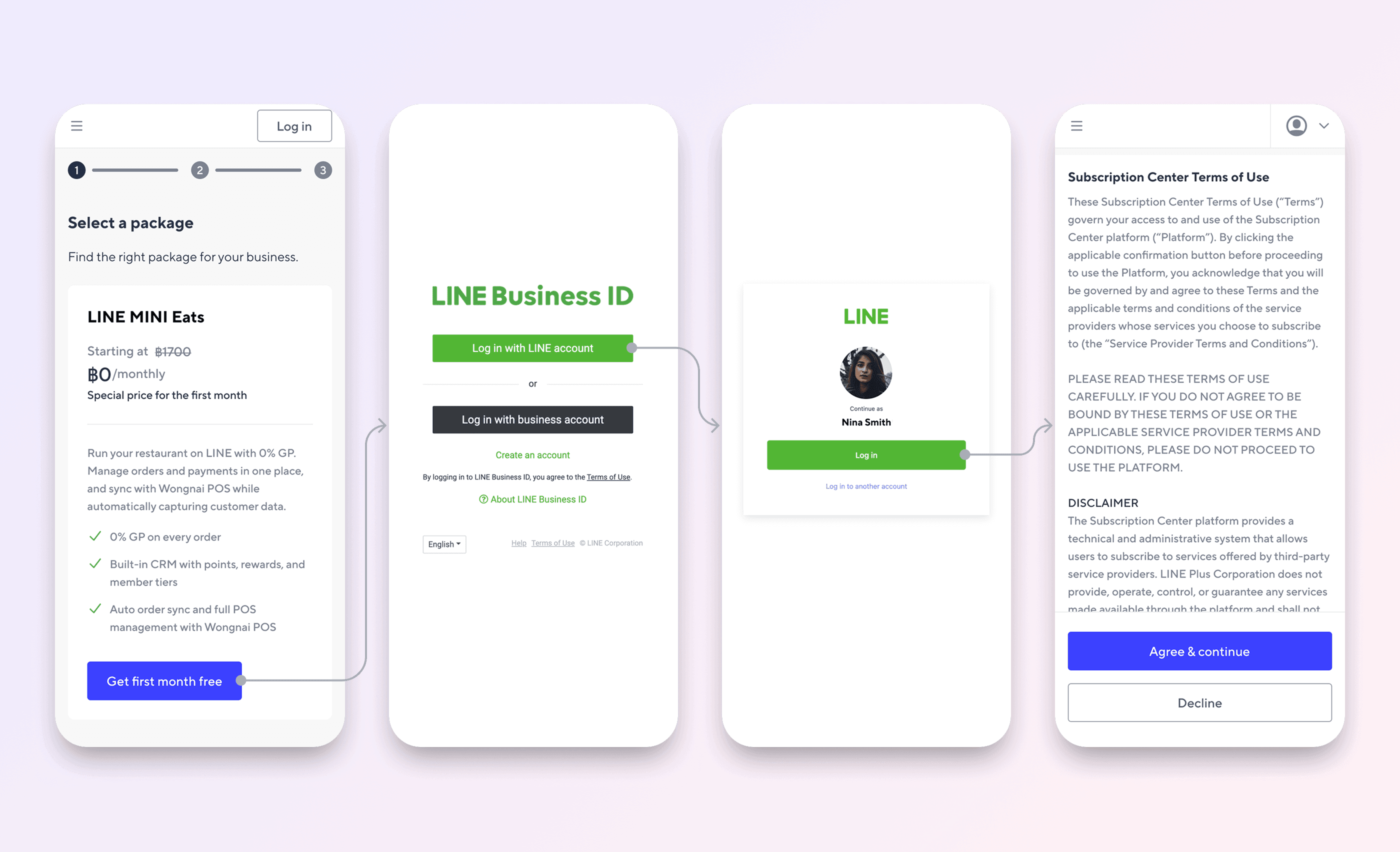
Package selection with step indicator, LINE Business ID login, returning user auto-login, and Terms of Use agreement.
⇥ A three-step progress indicator on the first screen. Merchants see the full journey before they commit to starting it.
⇥ The flow adapts to the merchant's actual state: already logged in, already has an OA, or starting from scratch.
⇥ Terms of Use come after authentication, before payment. The merchant is informed and in the flow before being asked to agree.
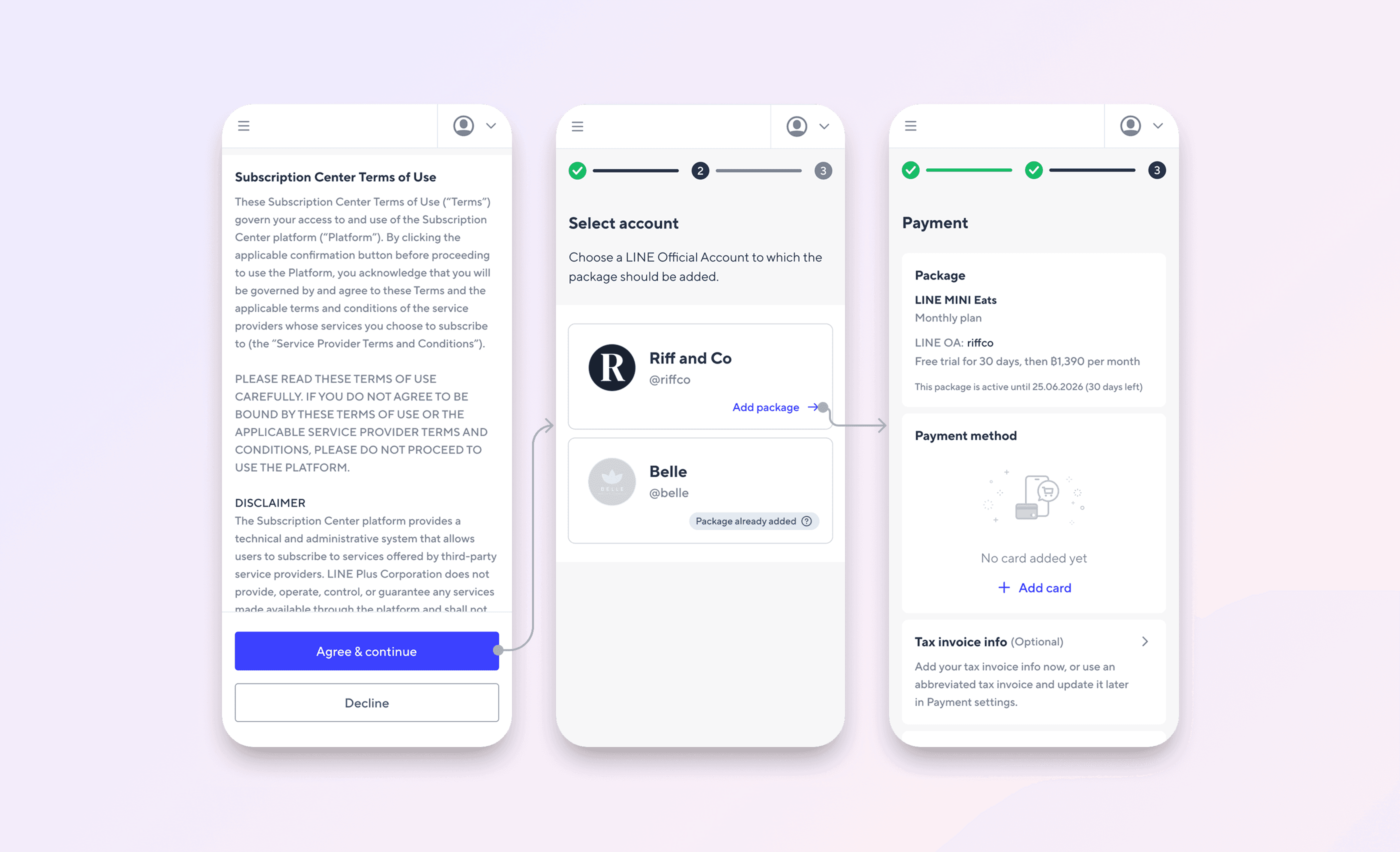
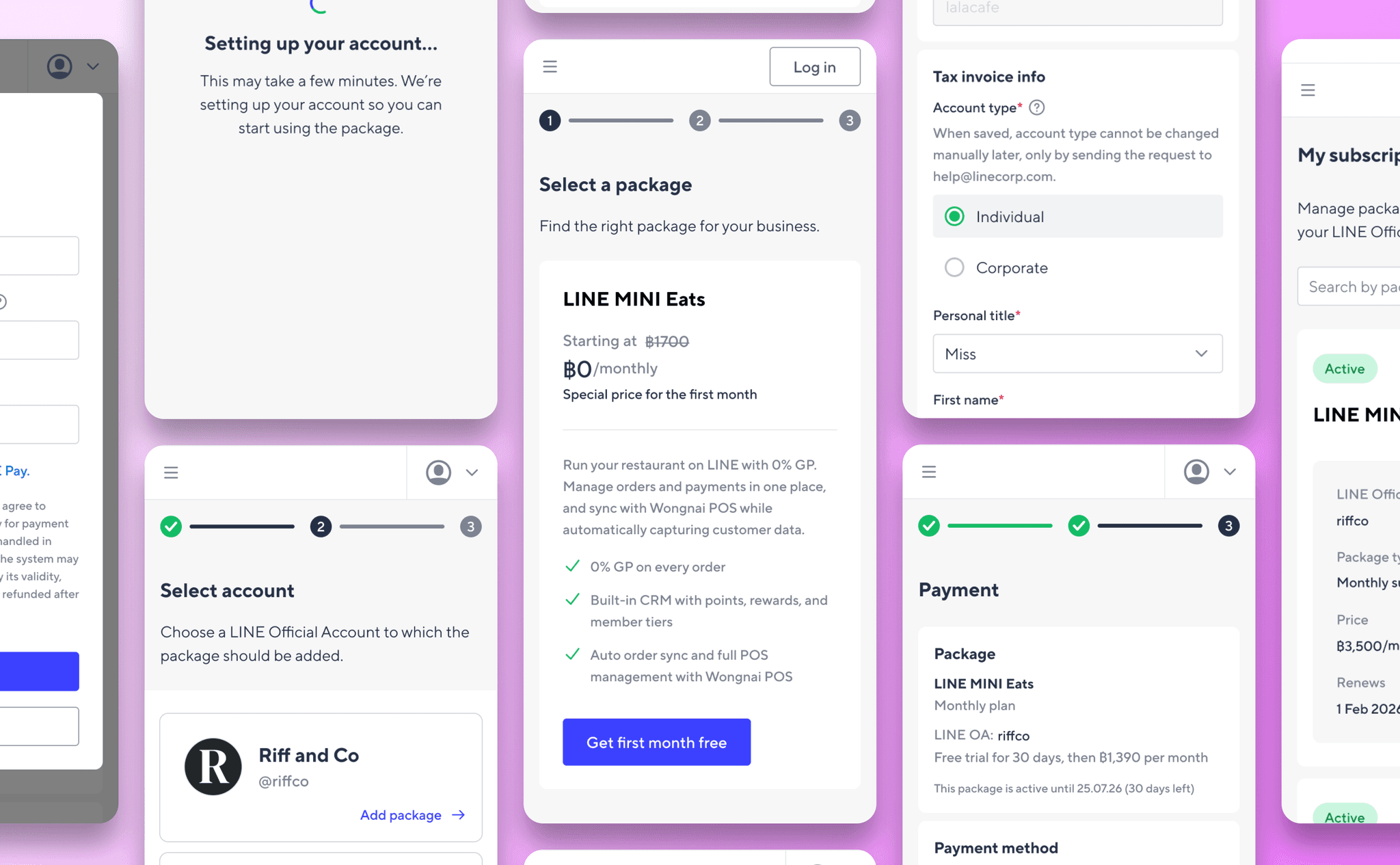
The purchase flow covers three steps. After authentication and ToU agreement, the merchant selects which OA to attach the package to. The OA selection screen prevents duplicate purchases by marking accounts where the package already exists. The payment screen shows the full pricing breakdown including the trial period, regular price, and expiry date before the merchant commits. Tax invoice collection is optional and deferrable. After payment, a loading screen acknowledges that account setup takes a few minutes rather than silently processing.
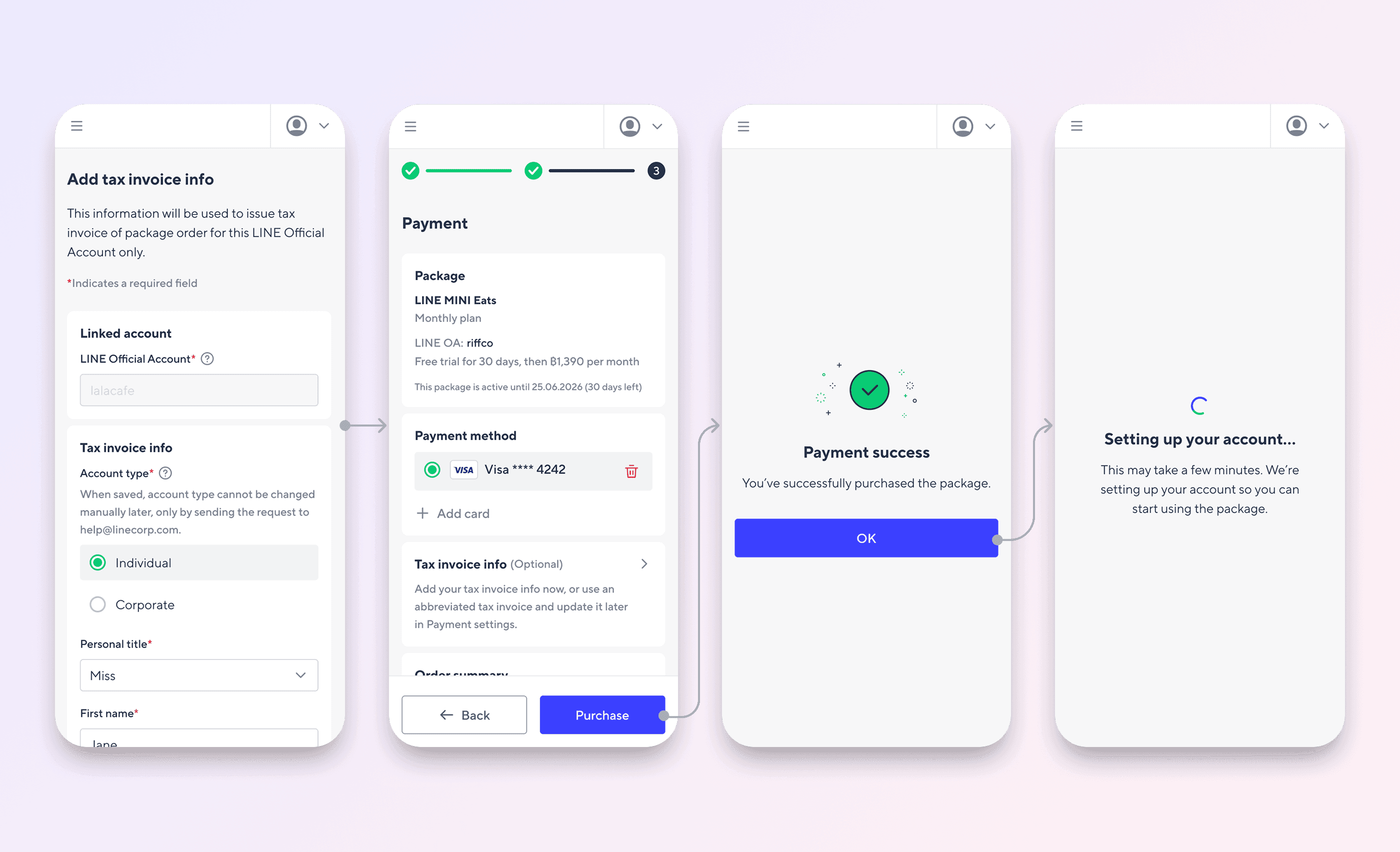
Optional tax invoice form, payment confirmation, and account activation loading screen.
⇥ Each OA is listed. One already has the package added and is visually disabled with a badge. Duplicate purchases are prevented at the point of selection, not after.
⇥ Payment summary shows the full pricing picture: free trial period, regular monthly price, and the exact date the package expires. No surprises after purchase.
⇥ Tax invoice info is optional and can be completed later. Merchants are not blocked from purchasing if they don't have the details ready
On mobile, uncertainty about how long a flow will take is one of the most common reasons users abandon before completing it. Showing three steps upfront removes that friction entirely. Separating payment success from account activation manages expectations precisely: a merchant who sees a loading screen after a confirmed payment knows their money went through and that setup is in progress, rather than wondering if something went wrong.
After purchase, merchants can view and manage active packages, billing history, and tax invoices. Merchants can see the full history of their transactions in one list, sorted by date. Each entry surfaces enough information to identify the transaction without needing to open it.
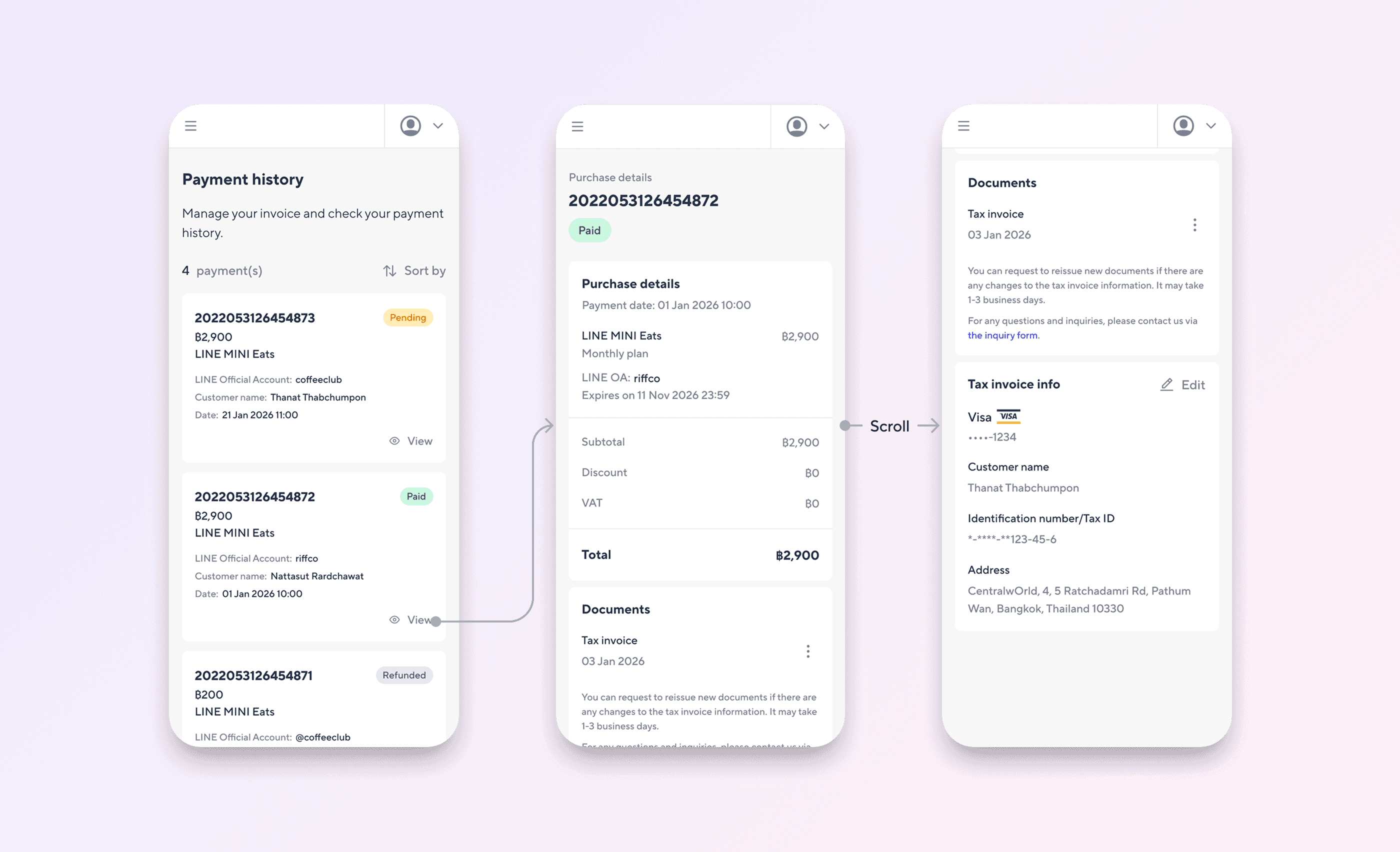
Payment history, Purchase details.
⇥ OA name and customer name shown per transaction, useful for merchants managing multiple accounts.
⇥ Full pricing breakdown: subtotal, discount, VAT, and total. Every line item is shown before the tax invoice is issued.
⇥ Tax invoice info is editable in-product. Merchants do not need to contact support to update their billing details.
A merchant looking for a specific invoice should not have to open every transaction to find it. Surfacing status, OA, and date in the list covers the most common lookup patterns without requiring any interaction. Also, Thai businesses have real tax invoice requirements. A merchant who cannot access, download, or correct their invoice without emailing support will email support. Putting invoice access and editing inside the product keeps that workflow self-serve and removes a predictable category of inbound requests.
Active subscriptions list with inline package details, and the bottom sheet management menu.
The subscriptions view shows every active package with the key details a merchant needs at a glance: which OA it is attached to, the plan type, the monthly price, and the next renewal date. Management actions are accessed through a three-dot menu that opens a bottom sheet, keeping the list view uncluttered.
⇥ Status, OA, price, and renewal date visible without drilling into the package.
⇥ Search available for merchants with multiple subscriptions.
⇥ All management options in one bottom sheet: change plan, legal documents, cancel.
The most common reason a merchant visits this page is to check something quickly: when does this renew, how much am I paying, which OA is this attached to. Putting those four data points on the card itself means the most frequent task requires zero taps.
Cancellation flow
The cancellation flow is handled in the core subscription portal, with an LINE messanger notification sent on completion.
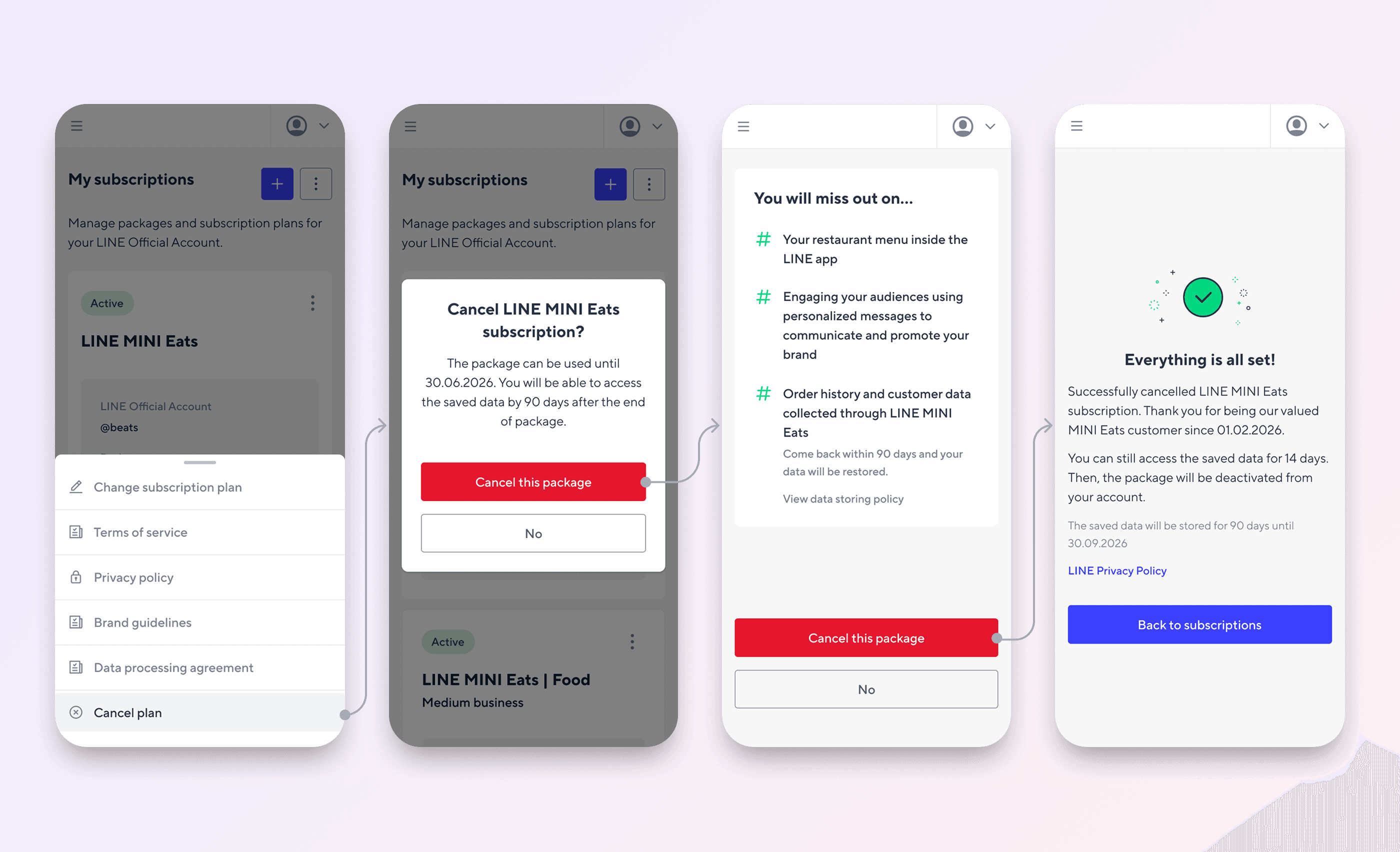
Cancellation flow - Happy case
⇥ The first confirmation modal shows the package end date upfront. The merchant knows exactly what they are agreeing to before going further.
⇥ The second screen shows what they will lose. Practical info comes first, emotional reminder comes second.
⇥ The success screen confirms the cancellation, shows the data retention window, and gives the exact date data will be deleted.
The sequence is deliberate. Showing the end date first is practical information a merchant needs to make a decision. Showing what they lose second is a last reminder of value, not a guilt trip. Splitting these into two screens means neither gets buried. The success screen with a specific date ("data stored until 30.09.2026") replaces ambiguity with something a merchant can act on.
The two highest-stakes moments in this flow are payment and cancellation. A wrong tap on an irreversible action, or a form error that loses entered data, has direct consequences for the merchant. Accessibility decisions were made with those moments specifically in mind.
01. Touch targets on destructive actions
All interactive elements meet a 40x40px minimum, including the confirmation buttons on the cancellation screens. On screens where the wrong action cannot be undone, undersized targets shift the risk of an interface error onto the user. 40px was chosen over the 44pt Apple HIG recommendation: it aligns with Material Design 3's compact density specification (40dp minimum) and comfortably exceeds the WCAG 2.2 AA floor set by SC 2.5.8, which requires 24x24px.
02. Colour contrast
Text and interactive labels meet WCAG 2.1 AA: 4.5:1 for body text, 3:1 for large text and UI components. Status and error states are communicated through icon and label alongside colour, not through colour alone.
03. Input optimisation
Input fields use context-appropriate keyboard types: numeric keyboards for payment fields, email keyboards for email inputs. Body text is set at a minimum of 16px to prevent iOS from triggering automatic zoom on focused inputs, which would break the layout mid-flow.
04. Perceivable feedback
Loading states for async actions (payment processing, activation, cancellation) are implemented as visible indicators and announced via ARIA live regions, making them perceivable to screen reader users. The success screen after cancellation provides a specific date rather than a vague confirmation, giving all users something concrete to act on.
Self-serve B2B flows fail when they hide complexity instead of managing it
The temptation with a multi-step purchase flow is to simplify by removing steps or combining screens. But a merchant connecting their LINE Business ID to an OA to a payment method is doing something genuinely complex. The design job is not to make it look simple. It is to make each step feel manageable. On mobile, that means one clear task per screen, not fewer screens.
Scope constraints are design inputs, not design problems
Single-branch only. No CRM cancel for MINI App packages. These constraints did not make the design worse. They made it honest. A product that clearly explains what it does and what it does not is easier to trust than one that quietly fails at the edges.
Infrastructure integrations require more design than they appear to
Payment flows, LINE login, OA linking: none of these are pass-throughs. Every handoff between systems is a moment where the user's mental model of the flow can break. Designing those transitions well required understanding the underlying systems deeply enough to know where the seams were, and then making those seams invisible.